Demystifying Gemini Nano: Google’s Edge AI Engine Powering Android AICore
An in-depth look at Gemini Nano, Google's highly efficient LLM designed for on-device mobile AI. Explore its system architecture, real-world use cases, and Kotlin integration patterns.
Demystifying Gemini Nano: Google’s Edge AI Engine Powering Android AICore
The landscape of generative artificial intelligence has long been dominated by massive, cloud-hosted large language models (LLMs). While cloud models like Gemini Ultra and Gemini Pro deliver state-of-the-art reasoning, they present substantial challenges for mobile application developers: network latency, high cloud API costs, dependency on active internet connections, and sensitive user privacy concerns.
To address these limitations, Google introduced Gemini Nano—its most efficient model family designed specifically to run natively and locally on consumer hardware. In this article, I will unpack what Gemini Nano is, the architectural problems it solves, its system design, and how Android developers can integrate it into their production applications today.
🧠 What is Gemini Nano?
Gemini Nano is a lightweight, highly optimized version of Google’s multimodal Gemini model family. It is engineered to perform on-device inference directly on modern smartphones and tablets.
Unlike general-purpose models hosted in distant data centers, Gemini Nano runs directly on local silicon—specifically leveraging the system’s Neural Processing Unit (NPU), GPU, and CPU. It is distributed in two distinct sizes:
- Gemini Nano-1 (1.8B parameters): Designed for lower-memory and mid-tier devices.
- Gemini Nano-2 (3.25B parameters): Designed for high-performance flagship devices.
Despite its compact scale, Gemini Nano delivers impressive results on tasks like summarization, proofreading, formatting, contextual replying, and lightweight entity extraction.
🎯 What Problems Does Gemini Nano Solve?
Running AI models locally solves four critical bottlenecks inherent to cloud-based LLM architectures:
1. Zero Network Latency
Cloud-based inference requires a network round-trip. Even with high-speed 5G connectivity, sending a prompt, waiting for cloud queues, processing, and streaming tokens back can easily take several seconds. Gemini Nano executes inference locally, offering near-instantaneous first-token latency (often sub-100 milliseconds) for highly interactive UI states.
2. Complete User Privacy & Data Sovereignty
In many industries (e.g., healthcare, finance, legal), sending sensitive user inputs to external APIs violates compliance rules (like GDPR or HIPAA). With Gemini Nano, data never leaves the device’s sandbox. It is processed entirely in memory, making it the perfect solution for privacy-first applications.
3. Infinite Scalability & Zero Cloud Billing
Cloud LLMs charge developers per token (input and output). For an application with millions of daily active users, these costs scale linearly. On-device AI utilizes the user’s own device hardware for execution, meaning the developer pays $0 in API usage costs for local generation.
4. Resilient Offline Availability
Traditional AI assistants fail on airplanes, subway lines, or areas with poor cellular service. Because Gemini Nano lives on the device, it works flawlessly without a network connection.
🏗 System Architecture: Understanding AICore
Rather than requiring every Android application to bundle their own multi-gigabyte model weights inside the .apk package, Google implemented a centralized system service model starting with Android 14.
At the center of this architecture is AICore:
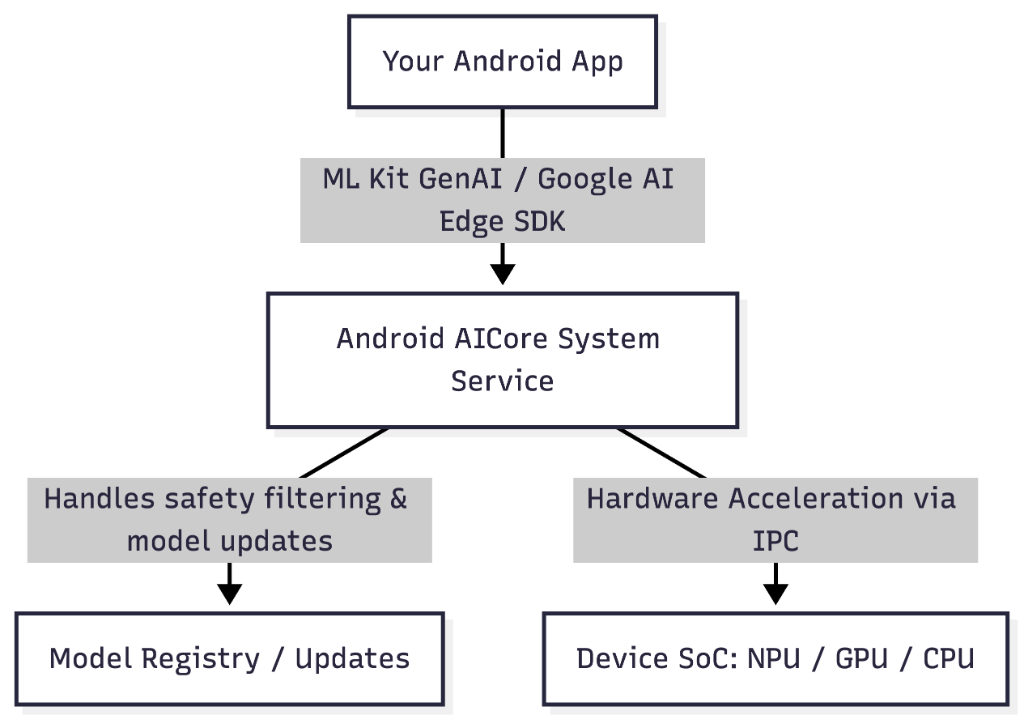
Key Architectural Pillars of AICore:
- Centralized Model Lifecycle Management: AICore acts as the single source of truth. It downloads, provisions, and updates Gemini Nano automatically in the background via Google Play services. This keeps the application binary size small and guarantees that the model receives safety updates.
- Inter-Process Communication (IPC): Applications interact with AICore through highly optimized IPC channels. Because the model weights are loaded into the system service’s memory space and not your application’s heap, your app is protected from out-of-memory (OOM) crashes.
- Safety Filters: Inputs and outputs are automatically audited by system-level safety filters before reaching your application logic, preventing the generation of harmful or offensive content.
- Hardware Translation Layer: AICore dynamically negotiates hardware drivers (like Android Neural Networks API - NNAPI, and Vulkan) to ensure the model runs on the most efficient accelerator (NPU) available on the specific chipset.
🌟 Best On-Device Use Cases
Because of its constrained parameter size, Gemini Nano is not meant to write long-form software architecture specs or solve complex multi-step physics problems. Instead, it is optimized for high-speed, localized cognitive utilities:
- Contextual Smart Replies: Analyzing chat history locally to suggest accurate replies in messaging apps.
- Text Summarization: Condensing long audio transcripts, legal agreements, or articles down to bullet points instantly.
- Grammar Proofreading & Formatting: Re-writing text in different tones (e.g., professional, casual) or correcting grammar inline.
- Sensitive Entity Classification: Redacting personal identifiable information (PII) from text logs before exporting them.
- Multimodal Descriptions: Creating short captions for local photos to enable fast semantic search within offline galleries.
🛠 Integrating Gemini Nano in Kotlin
The recommended path to consume Gemini Nano on Android is via ML Kit GenAI APIs.
Step 1: Add Gradle Dependencies
Add the ML Kit GenAI dependencies to your module’s build.gradle.kts file:
dependencies {
    // Standard prompt generation client for Gemini Nano
    implementation("com.google.mlkit:genai-prompt:1.0.0-beta1")

    // Optional task-specific clients
    implementation("com.google.mlkit:genai-summarization:1.0.0-beta1")
}
Step 2: Initialize & Check Model Status
Since Gemini Nano is downloaded on demand to compatible devices, you must verify availability before making inference calls:
import com.google.mlkit.nl.genai.FeatureStatus
import com.google.mlkit.nl.genai.Generation
import kotlinx.coroutines.flow.collect

suspend fun prepareOnDeviceAI() {
    val client = Generation.getClient()

    when (val status = client.checkStatus()) {
        FeatureStatus.AVAILABLE -> {
            // Nano is fully cached and ready to go!
            executeLocalPrompt("Summarize this: On-device AI is the future.")
        }
        FeatureStatus.DOWNLOADABLE -> {
            // Trigger background download via AICore
            client.download().collect { downloadStatus ->
                if (downloadStatus is DownloadStatus.Downloaded) {
                    println("Gemini Nano downloaded successfully.")
                }
            }
        }
        FeatureStatus.UNAVAILABLE -> {
            // Fallback to a cloud model or disable GenAI features
            println("Device does not support Gemini Nano.")
        }
    }
}
Step 3: Run Inference
Once ready, prompt execution is simple and handles streaming responses for maximum user responsiveness:
import kotlinx.coroutines.CoroutineScope
import kotlinx.coroutines.Dispatchers
import kotlinx.coroutines.launch

fun executeLocalPrompt(promptText: String) {
    val client = Generation.getClient()

    CoroutineScope(Dispatchers.Default).launch {
        try {
            val response = client.generateContent(promptText)
            println("Response: ${response.text}")
        } catch (e: Exception) {
            println("Inference failed: ${e.localizedMessage}")
        }
    }
}
📈 Summary: Cloud vs. Edge Trade-offs
| Feature | Cloud AI (Gemini Pro/Ultra) | On-Device AI (Gemini Nano) |
|---|---|---|
| First Token Latency | High (500ms - 2s) | Ultra-Low (<100ms) |
| Inference Cost | Pay per token | Free (Runs on user’s silicon) |
| Offline Support | No | Yes (100% Offline) |
| Data Privacy | Requires sending data to cloud | 100% Secure (Local device sandbox) |
| Model Size / Reasoning | Very High (Trillions of parameters) | Moderate (1.8B - 3.25B parameters) |
| Hardware Dependency | Low (Any thin client) | High (Requires modern NPU/SoC) |
By integrating Gemini Nano alongside cloud models, modern Android developers can design hybrid architectures: utilizing Gemini Nano for instant, private, offline actions, and falling back to cloud engines only when deep reasoning is requested.